
Building your own FMOD plugins
Disclaimer: Written by a human. All mistakes are mine.
F-what?
FMOD (external link). It's an audio middleware for games. It basically replaces the audio system of whatever game engine you're using. So instead of using Unity's audio system, you'd use FMOD instead. I won't go into detail about why that might or might not be a good idea. A lot of people think it's a good one: it's used in Hades, Rise of the Tomb Raider, Celeste and more (external link).
To learn more about FMOD and how it works, I recommend to read the Celeste Getting Started Guide (external link) and download the FMOD project files that are linked in the guide. You can also watch this neat video walkthrough by (external link) by Kevin (external link) from Power Up Audio (external link). This is how I started to learn FMOD in general and how it's used in practice.
Built-in FMOD effects
If you build a game you want your audio to react to things that happen during gameplay: You want your cave level to have more reverb than the forest level. Or you might want to apply a low-pass filter if your hero is about to die.
FMOD comes with effects you can use for exactly that: chorus, compressor, reverbs, delays, etc (external link)... but what if you want an effect that is not built-in? Or you simply don't like the ones that come with FMOD?
You bounce down the audio in your DAW.
This of course works and people have been doing it, but it has downsides:
-
Pipeline friction: If you "just want a tiny bit more reverb", you have to re-apply the effect to all assets and rebounce. And you have to repeat that every time you want to change the effect.
-
Game size: You have to create multiple variants of an asset; for every effect variation you want. This gets worse if you want two have multiple effects applied, of course. Players might be used to bigger and bigger games; but this is still a problem on some platforms; especially mobile.
-
Just more files: You will end up with assets like
hero-footstep-reverb-20.wav,hero-foostatep-reverb-30.wav, etc. - Even if those are small, it's still annoying and can be harder to reason about. What is the20and30in those filenames?
So you either have to stick with FMOD plugins or apply your favorite audio effects in your DAW and re-bounce constatly. Or, do you?
It turns out, you don't have to!
Writing my own distortion plugin
There is a middle ground: FMOD allows you to write your own Plug-in DSP Effects (external link).
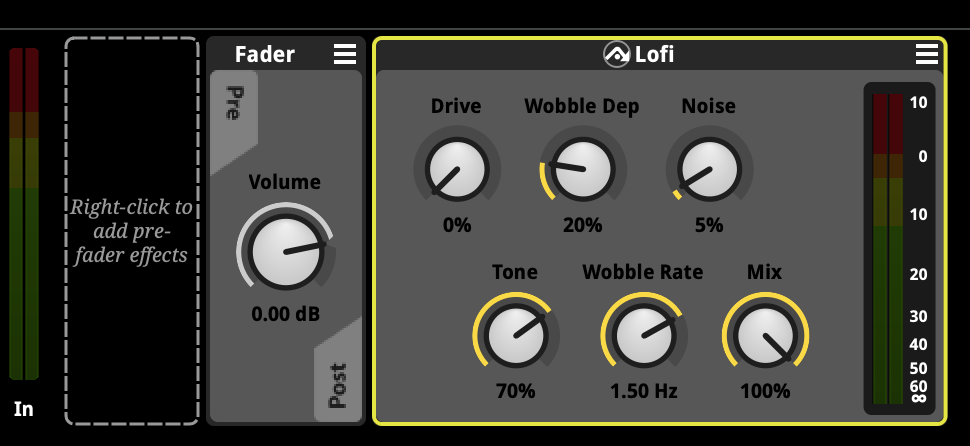
To see how it works, I created a simple distortion effect called fmod-lofi and put it on GitHub: https://github.com/kai-kuehne/fmod-lofi (external link).
After building fmod-lofi and and putting it into the FMOD Plugins folder, I can use it like any other effect right in FMOD Studio:
What's next?
My plan is to check out various (external link) cool (external link) open source projects (external link) and learn from them. I want to convert at least one of them into an FMOD plugin (given licensing allows for that). That way, I could use a really high-quality tool right in FMOD.
Anyway, fmod-lofi works, and it sounds okay. I'm at the beginning of all this and the DSP code itself probably can be improved a lot. But that isn't really the point I'm trying to make.
The point is the idea itself: It's possible to actually create your own plugins for your own games! I think that's cool.
If you make one yourself, let me know! Drop me an E-Mail if you like.